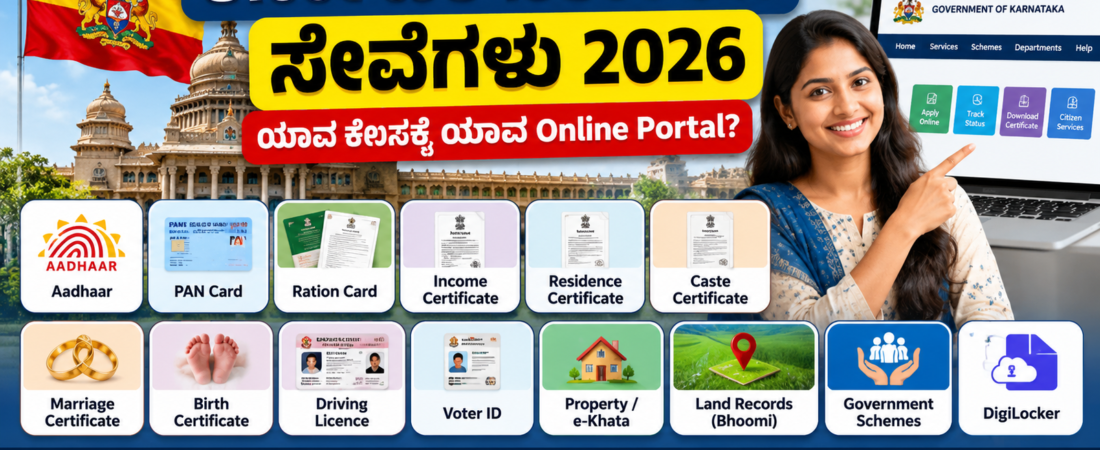
KARNATAKA GOVERNMENT SERVICES • 2026
Karnataka Government Services 2026: ಯಾವ ಕೆಲಸಕ್ಕೆ ಯಾವ Online Portal? ಸಂಪೂರ್ಣ Guide
Certificate, Aadhaar, Property, Ration Card, Driving Licence, Jobs, Schemes ಮತ್ತು ಇತರ ಸರ್ಕಾರಿ ಸೇವೆಗಳಿಗೆ ಸರಿಯಾದ portal ಆಯ್ಕೆ ಮಾಡುವ ಸರಳ ಮಾರ್ಗದರ್ಶಿ.
ಸರ್ಕಾರಿ ಸೇವೆಗಳಿಗೆ onlineನಲ್ಲಿ ಅರ್ಜಿ ಸಲ್ಲಿಸುವಾಗ ಸರಿಯಾದ official portal ಬಳಸುವುದು ಬಹಳ ಮುಖ್ಯ. Portal ಹೆಸರು ಅಥವಾ link ಬದಲಾಗಿರುವ ಸಾಧ್ಯತೆ ಇರುವುದರಿಂದ ಅರ್ಜಿ ಸಲ್ಲಿಸುವ ಮೊದಲು ಸಂಬಂಧಿಸಿದ ಇಲಾಖೆಯ ಅಧಿಕೃತ websiteನಲ್ಲಿ ಸೇವೆ ಲಭ್ಯವಿದೆಯೇ ಎಂದು ಪರಿಶೀಲಿಸಿ.
ಕರ್ನಾಟಕದಲ್ಲಿ ಯಾವ ಕೆಲಸಕ್ಕೆ ಯಾವ Online Portal?
ಒಂದು ಸರ್ಕಾರಿ ಕೆಲಸಕ್ಕೆ ಒಂದು portal, ಮತ್ತೊಂದು ಸೇವೆಗೆ ಮತ್ತೊಂದು portal ಇರಬಹುದು. ಕೆಳಗಿನ ಪಟ್ಟಿಯು ಸಾಮಾನ್ಯವಾಗಿ ಬಳಸುವ ಪ್ರಮುಖ services ಅನ್ನು ಸರಿಯಾದ department/portal ಜೊತೆ ಅರ್ಥಮಾಡಿಕೊಳ್ಳಲು ಸಹಾಯ ಮಾಡುತ್ತದೆ.
| ಸೇವೆ / ಕೆಲಸ | ಸಂಬಂಧಿಸಿದ Portal / ಇಲಾಖೆ | ಮುಖ್ಯವಾಗಿ ಏನು ಮಾಡಬಹುದು? |
|---|---|---|
| Aadhaar | UIDAI | Aadhaar ಸಂಬಂಧಿತ online services, status ಮತ್ತು ಮಾಹಿತಿ |
| PAN Card | Income Tax / authorised PAN services | PAN application ಮತ್ತು related services |
| Ration Card | Karnataka Food & Civil Supplies / Ahara | Ration Card services ಮತ್ತು ಕೆಲವು status/e-KYC ಸಂಬಂಧಿತ ಸೇವೆಗಳು |
| Marriage Certificate | Kaveri 2.0 | Marriage registration ಸಂಬಂಧಿತ online process |
| Property Registration | Kaveri | Registration, EC ಮತ್ತು ಸಂಬಂಧಿತ property services |
| RTC / Pahani | Bhoomi | Land record / RTC ಸಂಬಂಧಿತ ಮಾಹಿತಿ |
| Driving Licence | Sarathi / Parivahan | Learner Licence, DL services ಮತ್ತು application status |
| Voter ID | Election Commission | Voter registration, correction ಮತ್ತು status |
| Digital Documents | DigiLocker | ಲಭ್ಯವಿರುವ digital certificates/documents access |
| Government Schemes | ಸಂಬಂಧಿಸಿದ ರಾಜ್ಯ/ಕೇಂದ್ರ ಇಲಾಖೆ portals | ಯೋಜನೆಯ ಅರ್ಹತೆ, application ಮತ್ತು status |
1. Certificate ಬೇಕಾದರೆ ಮೊದಲು ಏನು ಮಾಡಬೇಕು?
Income Certificate, Residence Certificate, Birth Certificate, Marriage Certificate ಮುಂತಾದ ದಾಖಲೆಗಳಿಗೆ ಒಂದೇ portal ಇರಬೇಕೆಂದಿಲ್ಲ. Certificate ಯಾವ ಇಲಾಖೆ ನೀಡುತ್ತದೆ ಎಂಬುದನ್ನು ಮೊದಲು ಗುರುತಿಸಿ. ನಂತರ ಆ ಇಲಾಖೆಯ official portal ಅಥವಾ Karnataka government service channel ಮೂಲಕ ಅರ್ಜಿ ಸಲ್ಲಿಸುವುದು ಸುರಕ್ಷಿತ.
2. Property ಸಂಬಂಧಿತ ಕೆಲಸಗಳಿಗೆ ಯಾವ portal?
Property registration, Encumbrance Certificate (EC), stamp duty ಮತ್ತು registration ಸಂಬಂಧಿತ ಕೆಲಸಗಳಿಗೆ Kaveri services ಪ್ರಮುಖವಾಗಿವೆ. Land record/RTC/Pahani ಮಾಹಿತಿಗೆ Bhoomi ಸಂಬಂಧಿತ services ಬಳಸಲಾಗುತ್ತದೆ. e-Khata ಅಥವಾ local property-tax ಸೇವೆಗಳಿಗೆ ಸಂಬಂಧಿಸಿದ local authority portal ಕೂಡ ಬೇಕಾಗಬಹುದು.
3. Ration Card ಮತ್ತು e-KYC
Ration Card ಸಂಬಂಧಿತ ಸೇವೆಗಳಿಗೆ Karnataka Food, Civil Supplies & Consumer Affairs ಇಲಾಖೆಯ ಅಧಿಕೃತ channels ಬಳಸಬೇಕು. e-KYC ಅಥವಾ authentication ಮಾಡುವಾಗ third-party websites ಅಥವಾ ಅಪರಿಚಿತ APKಗಳನ್ನು ಬಳಸುವ ಮೊದಲು ಎಚ್ಚರಿಕೆ ವಹಿಸಿ.
4. Driving Licence ಮತ್ತು Vehicle Services
Driving Licenceಗೆ Learner Licence, Driving Licence application, renewal ಅಥವಾ related services ಬೇಕಿದ್ದರೆ official Parivahan/Sarathi service ಅನ್ನು ಪರಿಶೀಲಿಸಿ. ರಾಜ್ಯದ service availability ಮತ್ತು appointment requirements ಬದಲಾಗಬಹುದು.
5. Aadhaar ಮತ್ತು PAN ಸೇವೆಗಳು
Aadhaarಗೆ UIDAI ಮತ್ತು PANಗೆ Income Tax Department ಅಥವಾ ಅಧಿಕೃತ PAN service provider channels ಬಳಸುವುದು ಮುಖ್ಯ. Googleನಲ್ಲಿ ಕಾಣಿಸುವ ಪ್ರತಿಯೊಂದು website official ಆಗಿರುತ್ತದೆ ಎಂದು ಭಾವಿಸಬೇಡಿ.
6. Government Job ಮತ್ತು Scheme ಮಾಹಿತಿಯನ್ನು ಹೇಗೆ verify ಮಾಡಬೇಕು?
Recruitment notification ಅಥವಾ scheme announcement ನೋಡಿದಾಗ department name, notification number, application deadline ಮತ್ತು official website ಅನ್ನು ಪರಿಶೀಲಿಸಿ. Social media post ಅಥವಾ WhatsApp message ಮಾತ್ರ ಆಧರಿಸಿ payment ಮಾಡಬೇಡಿ.
Fake Government Website ಗುರುತಿಸುವುದು ಹೇಗೆ?
- Website address ಅನ್ನು spelling ಸಹಿತ ಪರಿಶೀಲಿಸಿ.
- ಸಂಬಂಧಿಸಿದ departmentನ official websiteನಿಂದ link ತೆರೆಯುವುದು ಉತ್ತಮ.
- OTP, Aadhaar, PAN ಅಥವಾ bank details ಅನ್ನು ಅಪರಿಚಿತ websitesಗೆ ನೀಡಬೇಡಿ.
- ಅಗತ್ಯವಿಲ್ಲದ APK installation ಅಥವಾ remote-access app ಕೇಳಿದರೆ ಎಚ್ಚರಿಕೆ ವಹಿಸಿ.
- “ತಕ್ಷಣ ಹಣ ಬರುತ್ತದೆ”, “guaranteed approval” ಮುಂತಾದ claims ಇದ್ದರೆ ಅಧಿಕೃತ notification ಪರಿಶೀಲಿಸಿ.
- Application fee ಇದ್ದರೆ official payment pageನಲ್ಲಿ ಮಾತ್ರ ಪಾವತಿಸಿ.
Online Application ಮಾಡುವ ಮೊದಲು ಈ Checklist ನೋಡಿ
- ಸರಿಯಾದ department ಮತ್ತು official portal ಗುರುತಿಸಿ.
- ನಿಮ್ಮ mobile number ಮತ್ತು email active ಇದೆಯೇ ನೋಡಿ.
- Required documents clear ಆಗಿ scan/photo ರೂಪದಲ್ಲಿ ಸಿದ್ಧಪಡಿಸಿ.
- Application formನಲ್ಲಿ ಹೆಸರು, DOB, address ಮುಂತಾದ ವಿವರಗಳನ್ನು documentsಗೆ ಹೊಂದುವಂತೆ ನಮೂದಿಸಿ.
- Payment ಮಾಡಿದರೆ receipt/application number save ಮಾಡಿ.
- Status check ಮಾಡಲು application/reference number ಸುರಕ್ಷಿತವಾಗಿ ಇಟ್ಟುಕೊಳ್ಳಿ.
Vinuinfooನಲ್ಲಿ ಈಗಾಗಲೇ ಇರುವ Detailed Guides
ಈ Master Guide ಅನ್ನು ಒಂದು starting point ಆಗಿ ಬಳಸಬಹುದು. ನಂತರ ನಿಮ್ಮ ಅಗತ್ಯಕ್ಕೆ ತಕ್ಕಂತೆ ಕೆಳಗಿನ detailed guidesಗೆ ಹೋಗಿ step-by-step process, documents ಮತ್ತು status-check ವಿಧಾನಗಳನ್ನು ನೋಡಬಹುದು.
- Karnataka Marriage Certificate Online Apply 2026
- Karnataka Income Certificate Online Apply 2026
- Karnataka Residence Certificate Online Apply 2026
- Karnataka RTC / Pahani Online 2026
- Karnataka e-Khata 2026
- DigiLocker 2026: Documents Download Guide
- PAN Card Online Apply 2026
ಸೇವೆ ಸಿಗದಿದ್ದರೆ ಏನು ಮಾಡಬೇಕು?
ಕೆಲವು services district, department ಅಥವಾ local bodyಗೆ ಅನುಗುಣವಾಗಿ ಬದಲಾಗಬಹುದು. Portalನಲ್ಲಿ service ಕಾಣಿಸದಿದ್ದರೆ ತಕ್ಷಣ third-party website ಹುಡುಕುವುದಕ್ಕಿಂತ ಸಂಬಂಧಿಸಿದ ಇಲಾಖೆಯ official websiteನಿಂದ service link ತೆರೆಯಿರಿ. Application number ಇದ್ದರೆ ಅದರಿಂದ status check ಮಾಡಿ; payment ಆಗಿದ್ದರೆ receipt ಮತ್ತು transaction reference ಅನ್ನು ಉಳಿಸಿಕೊಳ್ಳಿ.
ಸಾಮಾನ್ಯವಾಗಿ ಕೇಳಲಾಗುವ ಪ್ರಶ್ನೆಗಳು
ಎಲ್ಲಾ ಸರ್ಕಾರಿ ಸೇವೆಗಳಿಗೆ ಒಂದೇ portal ಇದೆಯೇ?
ಇಲ್ಲ. ಸೇವೆ ಮತ್ತು ಇಲಾಖೆಗೆ ಅನುಗುಣವಾಗಿ portal ಬದಲಾಗುತ್ತದೆ. ಆದ್ದರಿಂದ service ಹೆಸರಿಗಿಂತ ಮೊದಲು ಅದನ್ನು ನೀಡುವ department ಅನ್ನು ಗುರುತಿಸುವುದು ಮುಖ್ಯ.
Googleನಲ್ಲಿ ಮೊದಲಿಗೆ ಬರುವ website ಬಳಸಬಹುದೇ?
Search result ಮೊದಲಿಗೆ ಬಂದಿರುವುದೇ official website ಎಂಬುದಕ್ಕೆ ಅದು ಸಾಕ್ಷಿಯಲ್ಲ. Departmentನ official website ಅಥವಾ ಅದರ official service link ಮೂಲಕ ತೆರೆಯುವುದು ಸುರಕ್ಷಿತ.
Online application submit ಮಾಡಿದ ನಂತರ ಏನು save ಮಾಡಬೇಕು?
Application/reference number, acknowledgement, payment receipt ಮತ್ತು submitted formನ copy ಇದ್ದರೆ ಅವನ್ನು save ಮಾಡಿ. ಮುಂದೆ status check ಅಥವಾ correction ಸಮಯದಲ್ಲಿ ಅವು ಉಪಯೋಗವಾಗಬಹುದು.
ಸರ್ಕಾರಿ portals, fees, eligibility, deadlines ಮತ್ತು application process ಕಾಲಕಾಲಕ್ಕೆ ಬದಲಾಗಬಹುದು. ಆದ್ದರಿಂದ ಅರ್ಜಿ ಸಲ್ಲಿಸುವ ಮೊದಲು ಸಂಬಂಧಿಸಿದ ಇಲಾಖೆಯ ಅಧಿಕೃತ portalನಲ್ಲಿ latest information ಪರಿಶೀಲಿಸಿ.
ಸಾರಾಂಶ
ಕರ್ನಾಟಕದ ಸರ್ಕಾರಿ ಸೇವೆಗಳನ್ನು onlineನಲ್ಲಿ ಪಡೆಯಲು ಮುಖ್ಯವಾದದ್ದು ಸರಿಯಾದ portal ಆಯ್ಕೆ ಮಾಡುವುದು. Aadhaarಗೆ UIDAI, property servicesಗೆ Kaveri/Bhoomi ಸಂಬಂಧಿತ channels, ration cardಗೆ Food & Civil Supplies department, driving licenceಗೆ Parivahan/Sarathi ಮುಂತಾದ official channels ಬಳಸುವುದು ಉತ್ತಮ. ಯಾವುದೇ serviceಗೆ ಅರ್ಜಿ ಸಲ್ಲಿಸುವ ಮೊದಲು official sourceನಲ್ಲಿ latest information verify ಮಾಡಿ.
ಕೆಳಗಿನ linksಗಳನ್ನು ಸಂಬಂಧಿಸಿದ official government portalsಗೆ ಮಾತ್ರ ನೀಡಲಾಗಿದೆ. Portal open ಮಾಡುವಾಗ domain ಪರಿಶೀಲಿಸಿ.
🔹 Income Tax Department – PAN / e-Filing
🔹 Ahara Karnataka – Ration Card Services
🔹 Kaveri 2.0 – Registration & Property Services
🔹 Bhoomi – Karnataka Land Records
🔹 Sarathi – Driving Licence Services
🔹 Election Commission – Voter Services
🔹 DigiLocker – Digital Documents
Official portals and service availability can change. Before submitting an application or payment, verify the current information on the concerned department’s official website.